
Plugin for Adobe Photoshop – Windows and Mac
Stop navigating menus. Start working.
Build custom Photoshop panels by Drag-and-Drop: Tools
“Every unnecessary click adds up quickly.
I will never uninstall this plugin again.”
Hanno Keppel
Professional Photographer

Drag-and-Drop Customization
Effortlessly add and arrange tools, menu items, actions, and more with a user-friendly Drag-and-Drop interface, streamlining your creative process in Photoshop.
Flexible Organization
Tailor your workspace to your style. Reorder, rename, resize, and color-code your buttons and containers for an organized and efficient editing experience.
Multiple Workspaces
Create and switch between custom workspaces designed for different tasks or projects, enhancing focus and productivity.
Seamless Integration
Enjoy up to 3 dockable panels that integrate seamlessly into your Photoshop interface, ensuring tools and commands are always at your fingertips.
Full Walkthrough
Watch the complete 20-minute tour of Configurator Reloaded
What's New
v2.3.0
Command Search
Search as you type to find and run any menu, action, brush, tool, or script.
Learn More →v2.2.0
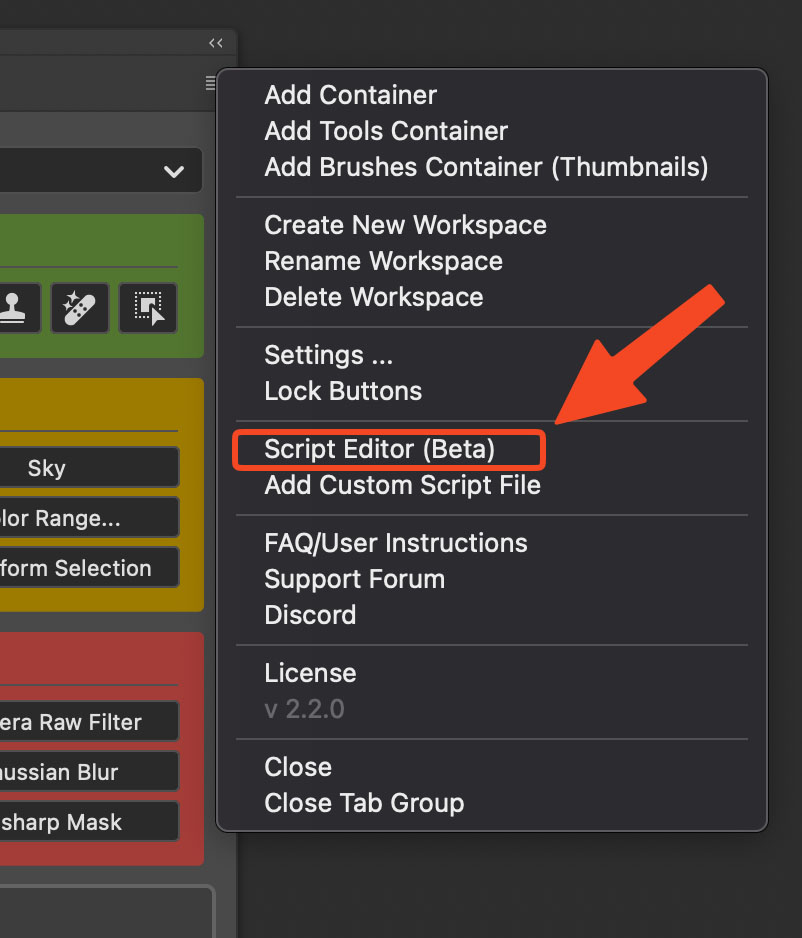
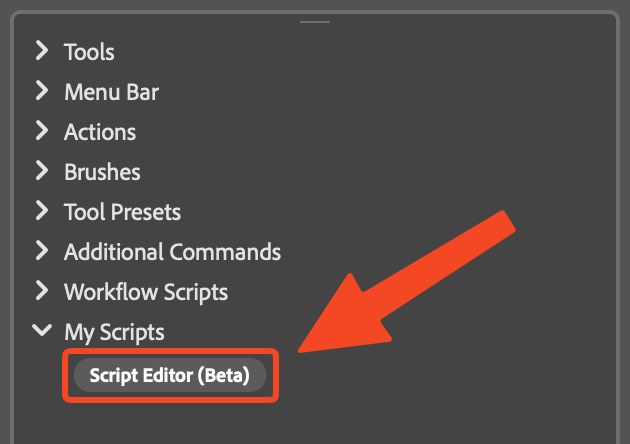
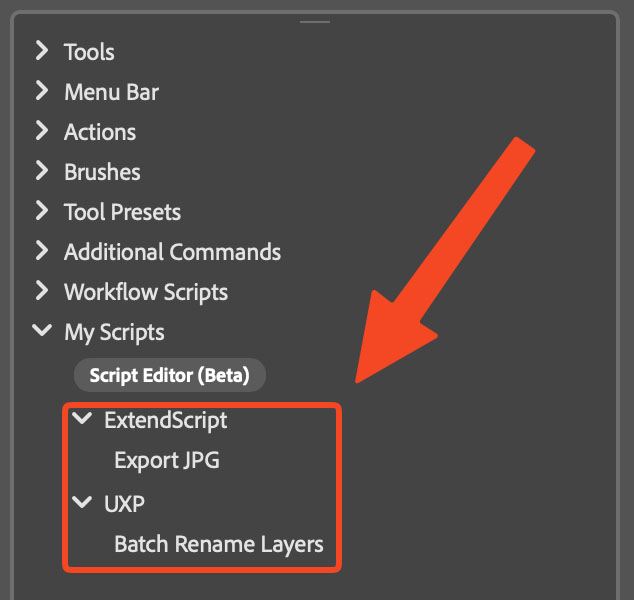
Script Editor
Write and run ExtendScript and UXP scripts directly inside the plugin.
Learn More →v2.1.4
Workflow Scripts
Built-in scripts for Frequency Separation, Luminosity Masks, and more.
Learn More →Perfect for PHOTOGRAPHERS
For Photoshop 2025 and newer versions
$59
With this lifetime license, you get free updates for one year. Once that period ends, you can keep using the latest version covered by your license indefinitely. To keep receiving new updates you'll need to purchase a new license.
Reviews
Phenomenal Tool!
When I first got Configurator Reloaded, I thought, "this is neat, I'll keep it around". THEN, I started using it more and am astounded with how much capability it provides, the range of options, and how much it incredibly helped and made using PS easier. I'm using it more & more and really, I'm thrilled with how much easier it has made my workflow in Photoshop. This is the BEST add-in to any program I've ever had. Seriously, it is fabulous and incredibly useful for my carpal tunnelized hand. BUY IT! You'll be more & more impressed them more you use it.
Richard Goldstein
Saves me so much time!
This is so great.—The ability to have every tool I commonly work with in one place, right next to my layers and adjustments saves me so much time during a full day retouching. I arrange the panel from top to bottom with my work flow. Having buttons that run actions to set up my default layers to the tools I use for detail retouching. Then below all the output tools I need for saving files to different formats and colour profiles. Continue the great work Thomas!
Ian
Configurator Reloaded
Very functional. A real time saver. The shortcuts I've made to my favourite actions, tools, and plugins has had a huge impact on workflow. It's all consolidated, making it unnecessary to continually reorient to various options on the photoshop menubar and move the mouse all over the place to get to a specific, regularly used element. Particularly useful in a dual screen setup, such as mine, where the graphic material is on one screen with all the tools, actions, panels on the other. Certainly a product that I would recommend to anyone who spends time in Photoshop.
Johann Schutte
Configurator Reloaded Photoshop
Absolutely love it and wish I got it earlier so quick and easy. Well thought out for easy use. I would recommend it for anyone using Photoshop!
Jacquie Hebert
Wonderful tool
Although I have bought this tool a short time ago, I am sure it is worth every penny. Long ago I used Corel Photopaint, where almost everything could be put under a button, very flexible and time saving. Having to scroll down menus and submenus in Photoshop was a nuisance, certainly because I am right-handed and have to 'mouse' left-handed because of a neurological disorder right. Wonderful tool, this!
Hans van den Berg
Essential
What a great product - I find this essential in photoshop, which I use professionally day in, day out. It is ESSENTIAL to me.
Ian
Great product
Great product. Very handy!. Just configured it to use with my Blake Rudis's Linear Light actions along with my own actions.
Nick Franken
Excellent tool
Greatly increases productivity, very useful for custom scripts.. highly recommended
Matt
Great Product
This really helps me in Photoshop and makes it a lot easier to get to tools, filters and more. I really like it.
Richard Goldstein
Great Plugin
You will not run every feature it has. For years it has bugged me that Photoshop doesn't have a shortcut key for Rasterize Layer, you have to create an action or assign a hot key if you want to create a Rasterization fast method. It took me 1 minute when using Configurator to get my rasterize layer. Smart objects are becoming more popular again.
Gerald Thomas
Super fast and extremely easy
This is exactly what I needed. Have it configured just how I need it. Super fast and extremely easy. Thank You
Jack
INCREDIBLE
Configurator Reloaded is one of the most powerful and time saving tools in Photoshop! I could not be happier with my purchase!
Rob Sigler
Photoshop Leveled Up
I'm using Photoshop for almost 15 years. Used a lot of extensions but this is really something new, and above all of them. I can use all my actions with a single button and making me faster. Hide a lot of panels and using them from configurator etc etc. Thx for an extension like this. Please make more and make us faster 🙂
Şafak Karabal
Really useful
Very useful tool for organizing my actions and other tools an a way that fits my workflow! Thank you so much!
Kifo
Perfect for Illustration
When I use Photoshop, I always have a graphics pen in one hand, so I need quick shortcuts available to press with my other hand. Usually this is taken care of with the shortcut buttons on a graphics tablet, but when I had to move to a monitor with no physical shortcut buttons, Configurator Reloaded was a perfect replacement. With all of my most common actions grouped together on-screen, in the same place at all times, it's saving me tons of time.
D'Angelo Wallace
Amazing panel
One of the best add-ons to Photoshop out there for anyone who uses PS as a professional and needs to be efficient with their time, but doesn't like keyboard shortcuts and/or has tons of actions in their actions panel and hates the mess that creates. Great for people with OCD!
Mark Hazeldine
WOW - just WOW
What can I say? Thomas has REALLY excelled himself with Configurator Reloaded!!! What a well thought out and useful tool this is (one of the best I have ever come across) !! It is already paying dividends and helping to streamline my Photoshop Workflow. If you don't already have it - seriously - go BUY IT !!
Dave Wall Photo
Terrific tool!
Very handy and useful, easy to install, use and it saves so much time. Thanks 🙂
Robert Walker
Best thing with photoshop
I am happy to use it. Very useful and great. I hope I can use exported panel without counfigurator too in the future. 🙂
Zoltan
owner
It is great. Does what was promised. Easy to install and easy to manage. I wish to have an option to create separate sets so I can put them in a different parts of the screen. Comment from Thomas: In Version 1.6 it's now possible to open up to 3 different panels!
Simon
Very nice
Very nice replacement for for the discontinued Adobe Configurator. Easy to install and easy to customise and set up.
Tony Swash
Great product !
I was ready to start developing an interface to manage my actions, tools and more. Then i discovered Configurator Reloaded. For a few euros, saving a lot of time in development, i bought this fantastic product. Everything is there to manage all my daily tools, and more. I can just highly recommend this great product !
Gilles
Really nice Panel
Saves a lot of time, speeds up my workflow!
Michael
Great way to organize actions
It's a great way to get rid of a big pile of actions by being able to group them. Some more control to the button size will make this panels even more handy.
Roland
Perfect Tool
The tool is exactly what I was missing when working with my graphic tablet: Easy access to the most used functions. Well done!
Oli
Just Right
As a former Adobe Configurator user, I'd almost forgotten how convenient and efficient it is to be able to build your own panels. Thomas has done a great job in bringing back most of the functionality in a very easy to use and well crafted interface. Highly recommended if you spend much time in Photoshop at all.
Ron H
Just what the doctor ordered
This panel is supremely configurable to suit one's own particular way of working in Photoshop. The ability to drag in custom made actions is very welcome. So recommended !!
Nic Barlow
Great App
Easy to use and very helpful in organizing tools in Photoshop. Saves time and energy while processing.
Dennis Arculeo
Photoshop panel Configurator Reloaded.
Hi Thomas, I can tell you have put in a lot of time & effort into this panel. I am very happy with the panel. I'm still learning, but I am very happy with it. Keep up the good work. Kenny
Kenny Wright
Configurator Reloaded
The panel is great. Simple and intuitive in action. It gives you many creative possibilities. My congratulations.
wieslaw
Great!
This is a well designed and well made Panel. It is excellent for assembling a set of tools which are all associated with a specific type of Photoshop project, say, portrait retouching, or, generating HDR effects. It is really great if any of the steps in that specific workflow are Action-based. Everything required step-by-step can be assembled in a dedicated Panel, all in one place. Very fine (and highly recommended).
John Stevenson
Top tool
Optimizes my workflow.
Matthias Fourman
Brilliant
It makes the workflow immensely easier. It saves plenty of clicks and searching thanks to the customization options.
Ulrich Schmidt
Great tool
Simply great!
Mathey
Huge relief
I've been using the tool/extension for 14 days now and I have to say it's a huge relief when working in Photoshop. It's worth the money!!!
Uli Oberwelland
I couldn't be happier!
What luck that I discovered this really useful and practical piece of software through DOCMA. I retouch beauty photos very often following a strict scheme, and I always hated having to move the mouse back and forth across a 40" monitor! Now I can click ALL steps in one single place - it's truly fantastic!!!! Thank you for this program 🙂
Jörg Meyer
Indispensable
Configurator Reloaded is indispensable for me and a must-have in Photoshop. I'm glad this tool exists again after Adobe stopped developing their own tool due to the switch to HTML5.
Peter Schiess
Clear, structured work
This tool definitely helps structure and speed up the workflow.
Klaus
Never without it again
I wouldn't want to be without this tool. It's worth every cent.
Steffen
Great tool
I only recently installed the tool and I'm still getting used to it. But each time, it gets easier to work with the panel instead of searching and clicking the icons or menu items Photoshop provides. The panel is simple, practical, and really helps save time. Thanks Thomas - keep it up!
Dietmar
Top
With Configurator Reloaded my workflow is much more efficient and time-saving.
Helmer Lortz
SUPER
We offer courses and workshops on photography and image editing, including action programming. With "Configurator Reloaded" for Photoshop, actions can be executed better and very quickly. SUPER 🙂
Raymond Casey
What Adobe missed
Bravo Thomas!! Great tool. The update works flawlessly too. I don't want to be without this tool anymore.
Peter Kalks
Surprisingly good.
I thought for a long time about whether to buy the panel and whether it would really bring the desired workflow relief. And I have to say: I'm not giving it up anymore. It was absolutely worth it. Now I'm glad I have it. Thank you!
Dirk
SUPER!!!
This panel is staying on my Mac. An excellent tool. It makes my work with Photoshop much easier. Thank you.
Peter Kalks
Thank you
This panel makes working in Photoshop much easier and faster - I'm not giving it up. With the panel you have endless possibilities. 5*****
Mike
Super
I've wanted this for a long time. Everything freely customizable, anything can be integrated - simply great. The panel is worth the money. Especially useful with a graphics tablet: no more long searching; you can put in exactly what you need. Thanks!
Steffen Thomas
Never again without it
As a hobby photographer and image editor, I thought for a long time about getting Configurator Reloaded. Now I did it and... now I'm wondering why I didn't do it sooner. No problems installing and setting up the panel is really easy. Changes are done with just a few clicks. The most important controls, actions, etc. are quick to reach and it saves time while editing. Definitely recommended. Thanks and keep it up.
F. M. Fürst
Great Job!
Wow Thomas you really made the panel easy to use, I had a complicated project that was made in Confiurator 4 for CS6 and was able to make the menu work in CC v2019. Just tweeking some actions that needed to update with the new work flow. 5 stars for that and easy 0-learning curve.
Robert Teachout
Brilliant
A fantastic panel. Perfect for getting the most out of my Wacom Cintiq. Highly recommended!
Ingo Lindmeier
Good tool!
Checked it out - bought it - very satisfied!
Urs Gerber
Top
I had already created a lot of actions and workflows. With this panel I now have the perfect tool to speed up my workflow. It's easy and quick to adapt. I'm very satisfied.
Meyer Raphaela
Worth every cent!
I built panels with the original Configurator and used them heavily. That's why until recently I still worked with Photoshop CC (without a year), because it was the last version that supported (Java) panels. With Configurator Reloaded I now have all the possibilities again in current Photoshop versions - and with a much easier workflow for creating panels. When I saw what Configurator Reloaded can do, I bought it immediately without even looking at the trial. I was not disappointed: if you value a fast and simplified Photoshop workflow, Configurator Reloaded is the tool you need.
Thomas Madel
I don't want to work without it anymore
After testing the trial version for a few hours, it quickly became clear to me that I don't want to work without Configurator Reloaded for Photoshop anymore - especially since I work on a WACOM Cintiq 27 HD. Today I also bought the Configurator for InDesign...
Leslie G. Hunt
TOP!
I thought for quite a while about getting Configurator Reloaded and... thank goodness I did :-). Purchase and installation were smooth, setting up the panel is really easy, and if you want to change something it's just a few clicks. The most important controls, actions, etc. are clearly available with one click and overall it really saves time when editing. Absolutely recommended!
Ralf Hoffmann
Very good!
I'm really very happy with the panel. It provides many extremely useful tools that make work much easier! Actions that I otherwise would have had to create myself are now clearly arranged and reachable with one click. A great tool that's absolutely worth the money!
Wolfgang Hofmann
Finally
After Adobe stopped supporting Flash and Adobe's Configurator a few years ago, I could no longer use the panel I had grown to love with newer Photoshop versions. Now this is possible again with Configurator Reloaded - and I'm very happy about that.
Gartlgruber
Great tool
I've been using Photoshop for over 10 years. At some point I discovered Adobe's Configurator and really enjoyed it because it sped up my work by keeping my favorite tools close at hand. After Photoshop version 14 / Photoshop CC it was unfortunately over, because Adobe no longer supported the programming. So I stayed on that version even though my Photoshop subscription gave me access to newer versions. Now I've finally discovered Configurator Reloaded, which does everything even better than the old Configurator. For a few days now I've been using the latest Photoshop version again with my own tools in Configurator Reloaded. Thanks to the developer!
GCK.DD
PERFECT!
I will gladly never uninstall this panel again! As a professional photographer I spend countless hours in Photoshop every week - every unnecessary click adds up quickly. This tool is truly great! For another specialized application in my studios, Thomas even programmed a custom panel exactly to my needs! It works P E R F E C T, and even a necessary update due to a hardware and OS X upgrade was provided the same day. Thank you - I'll recommend you wherever I can!
hanno keppel
FAQ
Before purchase
After purchase
Using Command Search: 1. Open Command Search from the magnifying glass at the bottom right of the panel, from 'Plugins > Configurator Reloaded 2 > CR2 Command Search', or via a keyboard shortcut you assign in Photoshop. 2. Type to find the command, then move the highlight with the arrow keys. 3. Press Command+Return on macOS or Alt+Enter on Windows to add the selection as a button to the target Configurator panel shown in the footer. Full guide: Command Search overview
Pixelsucht developed custom solutions for


Are you a company or agency and need a plugin for an Adobe app?